AI Bid Writing: How to Use AI to Win More Bids (2026 Guide)
AI bid writing uses AI to draft, refine, and structure bid responses faster while keeping accuracy high. Here's how to use AI to win more bids in 2026

Co-Founder & CTO, AutoRFP.ai··12 min read
AI bid writing is not about letting a tool write the whole response for you. It is about using AI to speed up the repetitive parts, find the right content faster, and give your team more time to focus on strategy, compliance, and win themes.
With 65% of top-performing teams using AI proposal technology, it is clear that AI is becoming part of how stronger bid teams work. In this guide, we’ll show how to use AI across the bid writing process so you can respond faster, improve consistency, and increase your chances of winning.
What Is AI Bid Writing?
AI bid writing is the process of using AI to analyze bid requirements, draft and edit proposal responses, reuse approved content, and help teams submit stronger bids faster.
Analyzes bid requirements: You can upload an RFP, tender, security questionnaire, or bid document, and the AI can extract key requirements, deadlines, compliance needs, evaluation criteria, and response instructions.
Supports go/no-go decisions: AI can help teams review the opportunity, identify complexity, flag missing information, and decide whether the bid is worth pursuing.
Creates first-draft responses: Instead of starting from a blank page, AI can generate draft answers based on the bid requirements and your company’s approved content.
Reuses content from your library: AI can pull from past proposals, technical documents, policies, case studies, and approved answers to create more accurate and consistent responses.
Improves editing and rewriting: AI can refine answers for clarity, tone, structure, compliance, and buyer relevance, while keeping the response aligned with your brand voice.
Identifies gaps in the bid: AI can highlight unanswered questions, weak sections, missing evidence, outdated content, or areas that need input from subject matter experts.
Helps manage SME input: AI can route questions to the right experts, track blockers, and reduce the back-and-forth that often slows bid teams down.
Supports portal-based responses: Some AI bid writing tools allow teams to prepare, manage, and respond to bid questions more efficiently across tender portals and submission workflows.
Gives teams more confidence: AI can help review answers, flag low-confidence sections, and show which responses need human review before submission.
Here’s a video on how using AI in sales proposals, including tools like Claude, can help you. It may not be the best approach, but it gives you a good overview of what AI can do in the proposal process.


Video transcript
Transcript is auto-generated and may contain minor errors.
Have you ever wanted to use Claude to create your own custom word documents for sales proposals, RFIs, or other documents that you want to send to your prospects? I want to show you exactly how you can achieve this using Claude's brand new Claude skills. We're going to be creating a proposal just like this, completely AI generated, formatted to how exactly we want it, all based on the prospect's customer insights, so in relation to what they've told you in the sales proposal, their website, your website, and everything else you may want to include in this custom proposal for your prospect using AI. Let's jump into it. First, you can download this prompt and find it from the link in the description below, but this prompt is what we're going to be putting into our Claude project instructions to then be the basis of our document. So, you can see in this document in this prompt it has
the purpose, provides Claude with a role, and then a workflow to identify things like data sources. Here, if you've plugged in various MCPs, which are model contact protocol, or effectively integrations for AI into your other software, you can then have it talk to those tools to get relevant data. So, we use Grain for all our call recordings internally, but if you use something like Gong or other call recording software like Fathom, if they have an MCP available, you can connect it to Claude and have it then talk to that software for relevant discussions you've already had with your prospect for the sales proposal. So, first it identifies data sources. It also could be information from your CRM like HubSpot or Salesforce, and then it's going to research the prospect company. So, it might ask you for the prospect's website if it can't find it in the relevant information you've already provided, and it's going to look for relevant information about that prospect. It's then going to look at relevant case studies. A great proposal always talks about your customers and what they can achieve with your tool or
solution for the prospect that is relevant to that prospect. So, it's going to look for relevant case studies on your website. You can obviously provide it other information if you want if you It's not on your website, but it's going to look for case studies to understand your solution better. Then it'll look for current state information. So, this might be going through the call recordings and effectively looking for information about how the prospect currently works on there It's going to look for information on current state. So, that is how the prospect already solves the problem themselves. They might be an incumbent software or other solution they're using like an agency or something like that as well. Might be or they might be doing something a lot more manual. But effectively, hopefully through discovery and demonstrations and discussions you've had with the prospect, you would have a really solid understanding of their current state and that's what you're going to have here. So, that's step four. Step five, generate the proposal document. This is really cool. So, effectively skills you can either create your own custom skills or Anthropic have uploaded kind of base
skills to everyone's desktop instances. This is going to use the create skill that would already be in your instance especially on a paid plan. And then it's going to use that to create a which you can see here I've uploaded to Google Docs the finished thing, but you can upload it to Microsoft Word or any other kind of document editor as you see fit. It's going to look for consistent styling. Now, of course, you can go in and customize this prompt and or get AI I customize this prompt and have the styling be more specific to how you might do proposals. I've done it to how which is where I'm from does proposals. Then it's going to break that down and kind of present the finished document all AI generated to me that is really relevant to my company and relevant to the prospect and our solution for the prospect in the proposal. Then it will ask you additional questions have that if it can't find that information through the tooling and it will ask itself those questions to help kind of base it off of the document. Now, this is really cool. So, what kind of document is it actually going to create? So, we've looked at the steps that Claude will do to create the
document, but what is the document? And here, of course, you can go through and customize this prompt to make them all relevant for your proposals, but I've done something where it creates a cover page with relevant information, so that's what you can see here. I prepared by Where Software. It then does an executive summary. It creates a more information about understanding the prospect's business. You can see here, I've done Meridian Infrastructure Partners, which is just a made-up company for the example, but of course, this would be relevant for your prospect. Then it looks at current challenges. So, this is really cool. So, this would look at, for instance, call recordings or notes in your CRM or anything that you provided about the prospect's current challenges, and will weave that into the proposal to make it really relevant to the prospect. So, proposal cycle times and all these other kind of things that are relevant for this prospect in terms of their current challenges. And then here, you can see it's mentioned a number of stakeholders. So, Claude also then identifies and I've So, then Claude identifies some decision-makers and
mentions them in the proposal because they're who could be decision-maker, champion, economic buyer, exact sponsor, kind of different people in the sales process that you've talked to, and it's going to mention from those discussions and make that proposal very personalized and relevant for that prospect and whoever might be reading it. We also use in the prompt a good prompting technique, which is kind of Also, in our prompt, we use some prompt engineering skills. For instance, examples of good and bad, which the LM then understands better context around what kind of output it's trying to produce. So, here we have example of some bad framing, which might come across as like condescending to the prospect. You want to avoid that in our sales proposal. And then what good framing is. So, you can again update this prompt to make more relevant for your company, but it's a really good kind of starting point. Then you have challenge. Now we go to solution overview. So this is really cool. Based on your company and what Claude understands from your business and your solution, of course you can provide it more details, it's going to build out a solution overview and how your solution
is addressing those challenges for the prospect. And then finally kind of finish off with why why your company. What it's going to do there in the why company is it's going to look at kind of what your what the prospect is currently doing verse your solution and where the difference is and where the benefits are. Really powerful stuff. Then any relevant success stories and then look at implementation methodology, timeline, the team that'll be working with them. Then you kind of see it goes through and generates all these things in again in really nice formatting to my brand voice, colors, tone, and then generates that and provides a final output as well with the commercials and pricing. Of course you can provide things like a uh Notion or Google Drive link or PDF in your project that includes your pricing table and then kind of stand better in pricing. Or you can ask it to skip pricing and leave that for the rep to fill out. And then you can see there ROI and further information. So next step from here is you grab the prompt
then go to Claude desktop and this this is web browser we can do it in Claude desktop. Jump into your instructions and then paste the prompt in there. Also make any changes to the prompt that you would like. I've called out a couple of different things that you can make different I've called out a couple of ways you can customize this to make it more relevant for your business. First, you can add additional files. So I called out a pricing schedule. You could upload your case studies here as a PDF if you want and just add additional files as you would like that are relevant to what you would expect an AI to use to generate proposals. Could be a solution overview. It could be common pain points. Could be information about personas, industry analysis on the certain prospects industries that you sell to. So that's all going to be in your files. Then in your instructions, you can have Claude edit this prompt for you or you can edit it yourself and say, "Hey, when looking at case studies, look at this file." And so that way when the LLM goes to use these project instructions, it's going to know exactly what context it has to use from your project files for the relevant parts of
its output, its response, in this case the sales proposal. Then you can see here in instructions we can add tools. So I mentioned your MCP integrations or other integrations you might have with Claude. You can click here and add additional connectors. You can see we have a lot in our account, but you can add additional connectors here or have it to you can use recent web web search. I always use extended thinking. It uses more tokens, but it's very valuable. And then you can click there and say and turn on other tools. So if you use Gong for your sales recordings and transcriptions and you have the MCP enabled in Claude and you want it to use the relevant calls that you have with that prospect to generate the proposal, great. Connect the MCP tool, talk call it out in the prompt, use to do this X and Y, and then it's going to use that really efficiently and productively. So when you go into then create a Word doc, I've I've done one here and you really don't have to use too much. You can be like, "Hey, can you create me a sales proposal for this custom for this prospect?" That might be if you if you have Claude connected to your CRM, it could be of the deal opportunity. It could be an email if it
has connections to your calendar or emails and figure out those people or you can provide a longer prompt with a lot more information. And then effectively goes through, uses the project instruction prompt, uses the relevant skill for creating the document, and then it's going to output and present you with a file that you can then download or add or open in Google Drive. And that will download as you can see it's a file and this is what you're going to have left. So I just covered off how you can use Claude desktop or Claude to create a sales proposal with a lot of different ways you can do this. If not just for your sales proposals, but if you're constantly doing RFIs that are pretty stock standard, you could use it to help with that. It really thrives where either you're expecting a lot of the same responses and you can give it past context or you want really customized proposals or RFIs where you have the data available to give it to Claude. It's not going to do well if you can't give it any context, it's going to be very bland, a very basic proposal. Whereas if you can give it
information that is relevant to that prospect, then that will make the proposal just that much better. And of course, you can go through in a Word Doc or Google Google Doc and update it as you see fit. Thing I will mention, I've of course spoken about how you can use MTPs. Make sure you're on a paid plan with Claude and make sure you you have training turned off. Make sure you're working in line with your IT governance, that you're not accidentally sharing a bunch of prospect information and your customer data with an LLM and it's going into the model for training. So make sure that's all turned off and you're talking to your IT team if you have any questions about your specific use case. Awesome. Thanks. That's how you can use Claude skills to create sales proposals.
If you want AI that can support the full bid writing process above, AutoRFP.ai is built for that. Book Demo with AutoRFP.ai to see how your team can analyze, draft, edit, and submit bids faster.
Where Generic AI (Like ChatGPT or Claude) Fall Short on Bid Responses
You can use generic AI tools like ChatGPT to help answer RFPs by uploading or pasting bid requirements, writing a clear prompt, and asking it to draft, rewrite, or structure your response.


Video transcript
Transcript is auto-generated and may contain minor errors.
Hey there. My name's Rob, and I'm from Auto RFP.ai. Today, we're going to be jumping into how you can use Chat GPT projects and the powers of Chat GPT's latest models to answer all of your requests for proposals, your requests for informations, requests for quotes, security questionnaires, and any expression of interest you might get from your potential buyers. Let's jump into it. So, here I'm going to create a new project. We're going to call that our RFP response project. And in this project, what are we going to be doing is pulling in all of our relevant company information, whether that be things like our policies and procedures, for instance, our business continuity policy. We're going to pull in other relevant information like our customer stories or case studies. We're going to pull in and most importantly, our past RFP responses. If you don't have any past RFP responses, potentially if you have other areas like your help documentation or
service documentations in relation to what kind of services or products you offer, that might be really helpful for kind of like functional or non-functional requirements that you might get in a request for proposal. All righty, let's jump into it. So, first we're going to start with instructions. Now, I've got one pre-planned here. And in an instruction, what that is is providing Chat GPT a lot of context and kind of like a master prompt that it uses in every single time it looks to answer any of our additional requests res- prompts in a chat. And so, it's really important to set up a master prompt or uh instruction here for success. So, what we have here is I'm giving it what part is it playing? So, it's a B2B SaaS sales professional cuz my fake company is a HR tech company in the US. We're an RFP manager and response writer, And its primary responsibility is to complete RFPs, RFIs, security questionnaires, and other relevant
information for this SaaS company. It's only going to be using official content provided and uploaded project files. So, I'm being really restrictive here in my instructions to really try to reduce the chance of hallucination. What I don't want happening is the AI to provide an incorrect response that it's made up on one of my RFPs. Of course, I'm going to be checking it before I submit it to the customer, but I want to make sure it's still pulling the information from the relevant files rather than just giving me kind of made up and hallucinated answers. So, I've provided a bunch of different prompts here and instructions to really make that less likely. Then, and then here, what I have is what kind of answers do I want ChatGPT to give? So, yes or no, one to two sentence explanations. I always like where it's, you know, yes, {comma} and then has information for that RFP. So, that's what I'm asking here. I'm going to click save, and I've just added that instruction to my ChatGPT
project. And you can see it here, and that's going to always going to use that when I'm going forward. Next, I want to add my files. Your files might be things in relation to your company like your company pro overview, your policies, your procedures, customer stories or case studies, and most importantly is your past RFP responses. So, if you've previously done RFPs or and proposals and so on, you want to make sure you're providing that information there. Again, make sure the information is timely, relevant, and don't provide too much here. Although I just said provide as much as possible, if you have too much, you're going to wait A, potentially hit the context window of the the token limit of ChatGPT when it goes to answer, and might not be able to look through all the documents, but B, it's actually more likely that you hit the limit that you can have in a project. But, start by giving it as much as possible, and then try to remove things if it's not as relevant for those
particular answers, or when you go to answer particular RFP, ask it to only refer to certain project files that are relevant for that RFP. So, here I'm going to add my documents. So, I have past RFP answers and business continuity plan, and I have a company document that's all really relevant for my request for proposals. So, I'm going to add that in, and then like I said, ChatGPT will be able to search those documents. Uh these are all in document .docx, they could be in PDF, PowerPoint, and so on, Excel, and it's going to then use that what I'm going to answer. And you can see there, there's my project files. Next, I'm going to be trying to answer a new RFP here. Can you help me answer this RFP? So, I'm going to add that file, and here's my fake RFP. This RFP is a fake library in the United States, uh and they're looking for HR tech,
specifically applicant tracking software, which is what my software, or fake software company, provides. Jumping in here, it's going to And you can see there, I haven't provided much of a prompt. Usually, if when I'm using ChatGPT, I provide a lot more information, but because I have those custom instructions and project files, it's using all that context when answering this particular information. So, even though this is quite straightforward, it's actually going to be looking through and then try to answer that information. It's now looking at You can see here, it's going through and analyzing. It actually did pick up that my fake RFP had two sheets. So, I've got a sheet for my non-functional requirements and a sheet for my functional requirements. And it's going to be going through here and answering that information. And there we go. It's answered that. So, let's have a quick look at it. So, I'll download that information.
Great. So, ChatGPT has gone through there that project instructions and looked to answer all of the Excel questions. So, jumping in here, we can see that it's completed the functional RFP responses. And you can see that I've kind of chatted through and asked it to have a look at all the relevant information. It's gone through and answered that information. And then I can kind of download those relevant CSVs. This one's a little bit confusing cuz I've had multiple tabs. So, it's kind of worked through all separately and then yeah, it tried to answer each one as it can. And you kind of see this information here. It's It's done pretty well. There's some pretty useful information. Uh and once I export that and pull it back together into a spreadsheet, I can have a look at what my functional and non-functional requirements look like. So, here I have my requirements. And you can see here it's kind of answered those different details. So, does my system support SSO integration with active directory? Uh yeah, it says it's a pre-built AD connectors are available. Um
whether this analysis is my fake customer, so whether this is correct or not, I'm not sure. So, I gave it some fake information to base it off. But, you can kind of work through it. And obviously, you would know your company best whether this information was actually correct. It hasn't really followed my instructions too well in terms of yes, {comma}. It's kind of just provided more generic description and comments. But, I can obviously go through here and answer those. Either way, it saved me a lot of time. It saved me from having to either A, manually go through and find those answers, or B, it saved me time from having to look back and kind of copy and paste between those responses. That's pretty good for a $20 a month subscription. Now, if you're doing anything larger than this, or if you want to save even more time, so I'm Rob and we're from AutoRFP.ai. We're an AI RFP software. So, you can kind of see here, we do everything that ChatGPT might be helping you with and a lot more. We have great collaboration
features, built-in trust scores, so you know how reliable that answer is, and not just and no project limit in terms of how many different content items you can have. You can load as many as you'd like. You can upload PDFs, Word docs, automatically answer and generate responses for you. We're trusted by some of the world's largest companies from startups to Fortune 500s, including software companies like Sugar CRM, Red Rover, or Fintech OS. And we're rated 4.9 stars and more on G2, Gartner, and other review sites. But, you can find out all about us at AutoRFP.ai. And if you're interested in learning more, you can of course book an online demonstration. I'm Rob from AutoRFP and I hope you found that run-through really interesting around RFP response with ChatGPT projects.
You can also use Claude to review longer RFP documents, summarize key requirements, and generate proposal answers based on the context you provide.


Video transcript
Transcript is auto-generated and may contain minor errors.
Hi there. I'm Rob from autoRFP.ai. In this video, we'll be covering how you can use Claude projects to automatically answer your request for proposals, your request for quotes, your request for information, due diligence questionnaires, and security questionnaires, all with the power of AI. Let's jump into it. So, what we've got here is our Claude project. How you create a project is have a page description go projects, create new project. And then once you've got your project, what we're going to be doing is adding in different project instructions and artifacts, which kind of like files to provide context to our Claude system to automatically answer our request for proposals. I was an account exec at a B2B SaaS company for over eight years, and I spent a lot of painful weekends manually doing RFPs. So, I'm really excited to see all your different LLMs and AI companies
like Anthropic, Google with Gemini, and of course OpenAI with ChatGPT, build out the ability to add additional files and context, and then wrap that in a project where it can remember and help answer our RFPs really effectively. So, I'm going to show you how. All right, next we're going to jump into project instructions. Really good tip here is you can actually use the LLM that you're using. In this example, we're going to be jumping on Claude Sonnet 4 from Anthropic. And with that, I can have it create the project instructions for me. So, jumping into my project instructions, you can see here it has context and role information all about the relevant self. In this case, you're actually a fake company I've created, which is an Apple pen tracking system called Talent Flow. You're a B2B SaaS consultant specializing in RFPs. Great. You're providing context to the LLM. What role
is it playing? What does it need to know? Our sales methodologies, marketing principles, persuasion. When we write a request for proposal, we're trying to say yes and fully compliant, partially compliant, or not compliant to the different questions. But we also want to persuade the reader that our solution is the best for their requirements. But here we have objectives. Really important is our positioning. But if you have information about your competitors, you can put that in your project artifacts. Make sure that when the court is doing that first run of your RFP response, it's thinking about competitive positioning. If you know which competitors are in that RFP process, specify it. Bias psychology, efficiency. All these things are really important with the RFP process. Then we have different information here regarding our pricing. I'll leave that to our sales team. And then here we have all our requests for information. So whether it's proof
points, security compliance, what to do for security questionnaires, and everything else. Really important also is our critical instructions. What's really important to the LLM when it's answering in this project, not to hallucinate. It doesn't mean it won't do it. But at least we'll give you a case that critically think and ensure that it's referring to our project artifacts and files before answering to make sure that's correct. Here we have all the other information that's kind of relevant for that instructions. So I'm going to save those instructions. Next is we're going to add our project knowledge, which are called artifacts. I'm going to upload that from my device. I have my talent flow information, business continuity plan, company documents, and a document around past RFP answers. This is the most important with our past RFP answers. So, if you have any previous RFPs that you've completed, make sure you're uploading that, whether it be a functional or non-functional, or past security questions, so that Claude
has your company information to pull from when looking to answer the RFP. I've also uploaded our kind of a company overview that has relevant information about our core product and services, our onboarding, our performance workforce analytics products, and everything else that's relevant. And then, we have our business continuity plan. Pretty common question is, "What is your RTO, RPO?" I've got that information there, and everything else kind of relevant there. So again, you can upload all those different information, whether it's your policies, your procedures, your company documentation, customer stories and case studies. Most important are those past RFP answers. Now that I've uploaded my project artifacts, I've got my project instructions, my Claude project is now ready to go. Really fun tip about your Claude project is you can actually make it available to everyone within your organization. You won't be able to see each other's chats necessarily, but everyone can then use the same project with the same
artifacts, the same project instructions, and therefore the same project knowledge to answer their RFPs collectively. It's a really powerful feature of Claude, and you can get started with that as well. So, let's actually go through. Can you help answer my RFP here for this library prospect? So, I've got a fake library that I'm going to be using to answer my RFP. So, let's jump in there. Claude has just answered those questions for us, and we can see here it's gone through, and it's attempted to create a CSV, which I can download and copy. It's a TXT. it's provided a summary to our response. Looking through here, it's got each of my requirements, and it's done an okay job. What's tricky about this one, I would say ChatGPT, which you can find in one of our other videos in the description below, it makes a lot easier to play with the data. I've then pulled that into a Google
Sheet, and we can see here it's answered each of those questions. It's done a pretty good job in relation to each of those different requirements. I would say it's it's it's okay. I would say it Is it saving me time kind of that manual RFP grind work that I'm doing? Yeah, it's saving me some time, but it's replaced it with some of the kind of uh manual work in then cleaning the data and making it easier to respond to. Although, when I use ChatGPT, which you can see in the the uh video in the description below, it was a lot easier to use the data. So, it's done okay. I love the Anthropic models. I use them daily for many different things, but here the way that it's presented back is going to take me a lot of effort to pull that together into my spreadsheet. But, it's done okay. I can still copy and paste and pull that into my spreadsheet, or from here I can copy and paste, or I can ask it for a different format, and it might provide a bit more help there as well. Now, if you're doing large RFPs, and you're finding that the LLMs are helpful and they're saving you a bunch of time
from having to manually copy and paste RFP responses, but you're looking for something a bit more fully fledged, well, I'm Rob from auto rfp.ai. So, we're an AI RFP software. You can find us at auto rfp.ai. We have effectively the ability to import all your RFPs, security questionnaires, due diligence questionnaires, whether it's PDF, Excel, Word Doc into our AI importer, and then once you import it in, that will come through and will automatically answer all those different questions with a variety of LLM's as well, not just a simple 4.0 step from ChatGPT or Sonic 4, actually using multiple LLM steps to answer those questions and give you the best response. Our re-ranker models will automatically try to find the best and most trustworthy sources in terms of your company data that you upload into our system for that information. And then you can have all your team collaboration relation as well, whether
it's approving and submitting different responses. We're trusted by companies all across the world, whether that's startups to Fortune 500's, including companies like Sugar CRM, Red Rover, and Fintech OS. And you can find out a lot more information on us, including kind of those different reviews we have from our happy customers at AutoRFP.ai. I'm Rob from AutoRFP, and hopefully that was helpful in how you can use Claude and Anthropic's project feature to automatically answer your request for proposals with AI. Thanks.
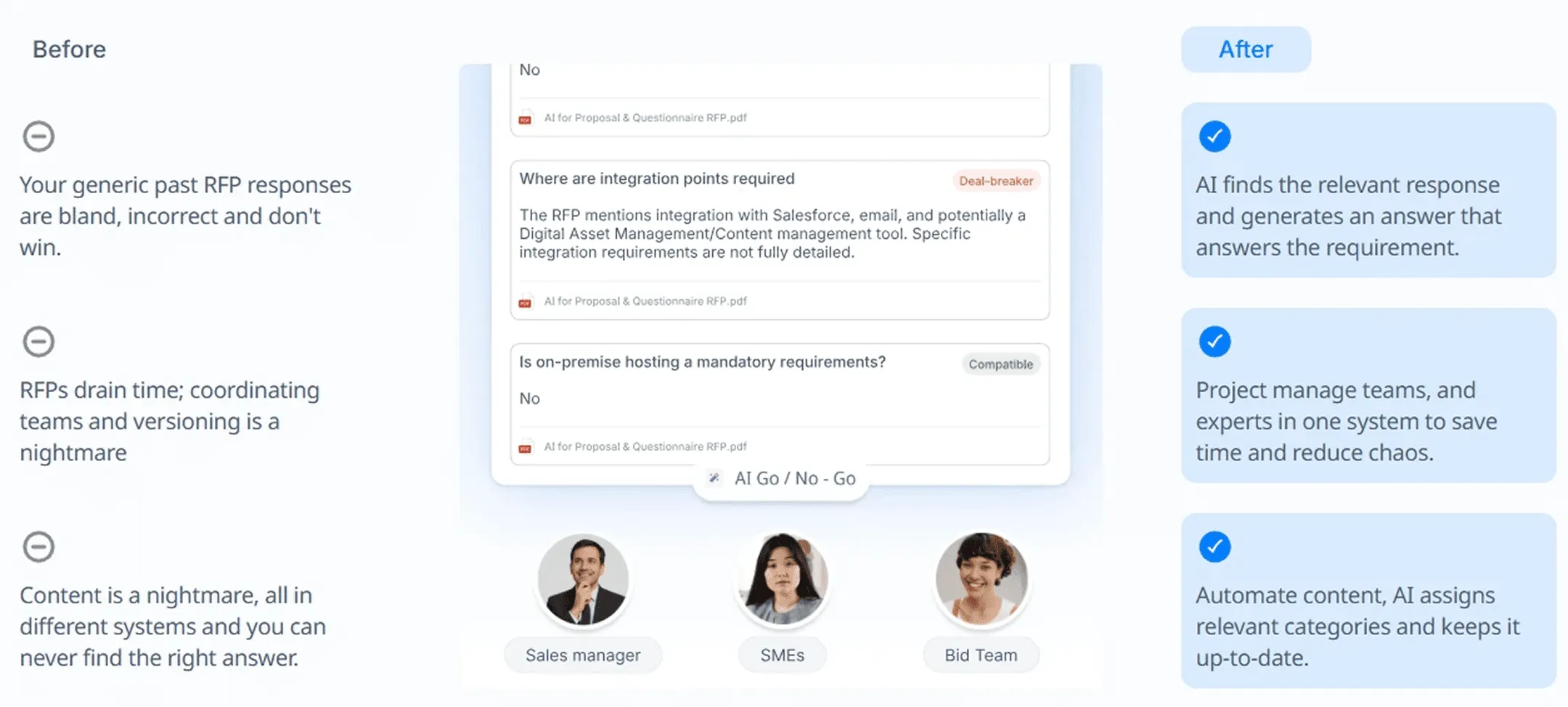
However, generic AI tools are not built specifically for bid management. They can help with parts of the process, but they usually do not manage the full bid workflow, content library, compliance checks, SME input, and portal response process in one place.
Generic AI tools:
Depend heavily on your prompt: The quality of the answer depends on how much context you provide, how clear your prompt is, and whether you remember to include every important requirement.
Do not automatically understand your approved content: Generic AI may not know your latest case studies, policies, product details, pricing language, security answers, or brand-approved messaging unless you manually provide them.
Can create inconsistent answers: If different team members use different prompts, the tone, structure, and level of detail can vary across the same bid.
May miss compliance gaps: Generic AI can help review a response, but it may not automatically track every RFP requirement, unanswered question, missing attachment, or evaluation criterion across a full RFP.
Are not built for bid collaboration: Most bids need input from sales, legal, finance, product, security, and technical teams. Generic AI does not usually assign questions, chase SMEs, track blockers, or show who owns each response.
Do not manage a reusable bid content library: You can reuse answers manually, but generic AI does not always know which answer is approved, outdated, high-performing, or ready to submit.
May need more manual review: Because the AI is not connected to your internal bid data, your team still needs to check accuracy, evidence, formatting, compliance, and buyer relevance before submitting.
| Area | Generic AI tools like ChatGPT or Claude | Purpose-built AI bid writing tools |
|---|---|---|
| Best use case | Drafting, rewriting, summarizing, and brainstorming individual responses | Managing the full bid response process from intake to submission |
| RFP analysis | Can summarize requirements if you upload or paste the right content | Can extract requirements, deadlines, gaps, and compliance needs more systematically |
| Content reuse | Depends on what you manually paste into the chat | Can pull from approved content libraries, past bids, policies, and technical documents |
| Accuracy | Needs strong prompts and human checking | Can work from approved company knowledge and show which answers need review |
| Collaboration | Limited unless managed outside the tool | Can support SME routing, task ownership, blockers, and review workflows |
| Consistency | May vary by user, prompt, and session | Helps keep responses aligned with approved messaging and brand voice |
| Gap analysis | Can help if asked directly | Can flag missing answers, weak sections, outdated content, and incomplete evidence |
| Portal response support | Usually manual copy-and-paste | Some tools support bid portals and structured response workflows |
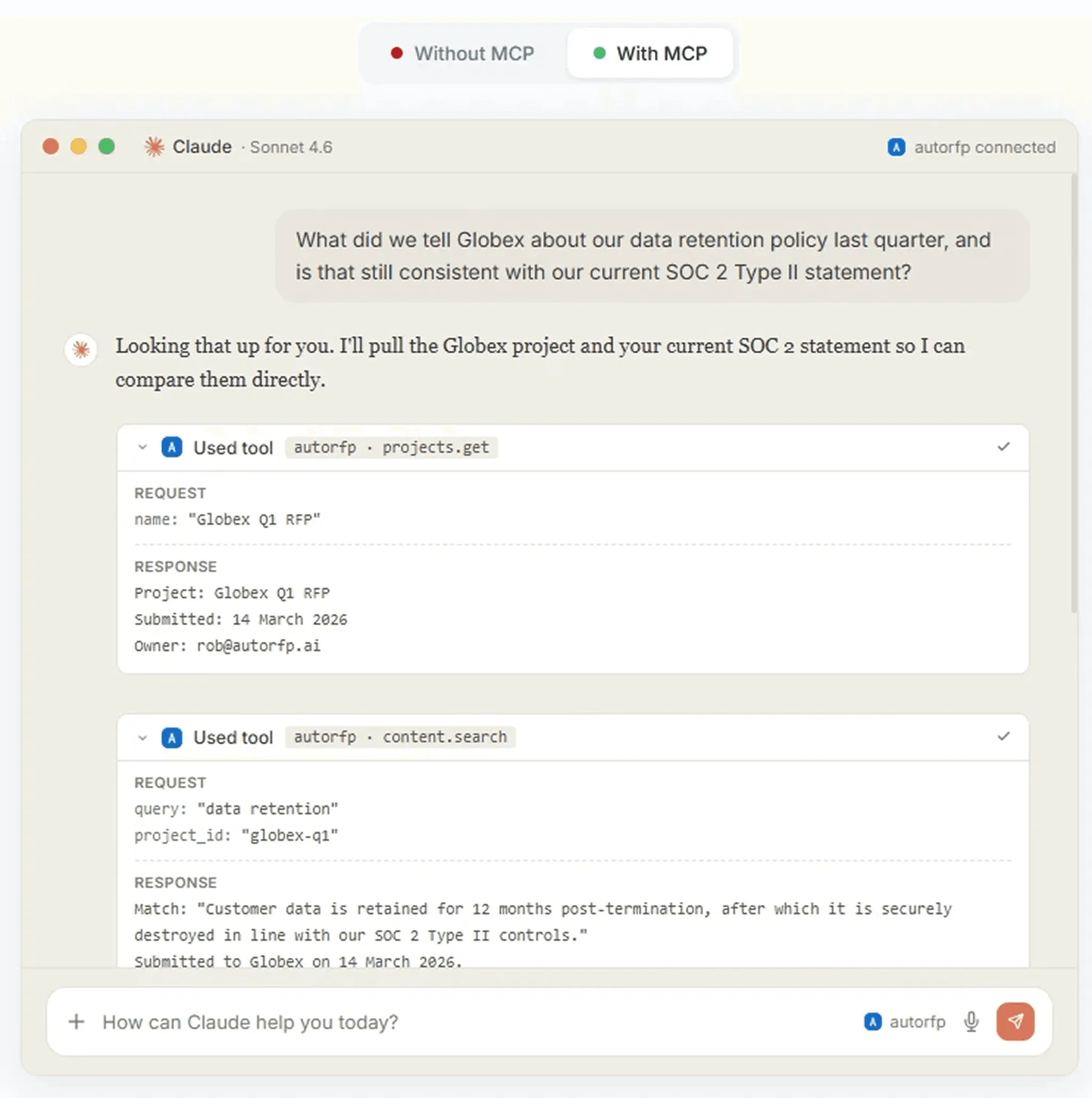
That is also why AI assistant integrations matter. Generic tools like ChatGPT and Claude become much more useful for bid teams when they can connect to approved projects, requirements, and content libraries instead of relying only on pasted context.
With AutoRFP.ai’s MCP server, teams can bring that bid knowledge into the AI assistants they already use, helping them search content, check contradictions, and work with live RFP data without switching between tools.
How to Use AI for Bid Writing Step by Step
Here’s how to use AI in bid writing to analyze requirements, draft stronger responses, reuse approved content, and review your proposal before submission.
1. Upload and Dissect the RFP
The first step is to upload the RFP, tender document, security questionnaire, SOW, or procurement file into your AI bid writing tool.
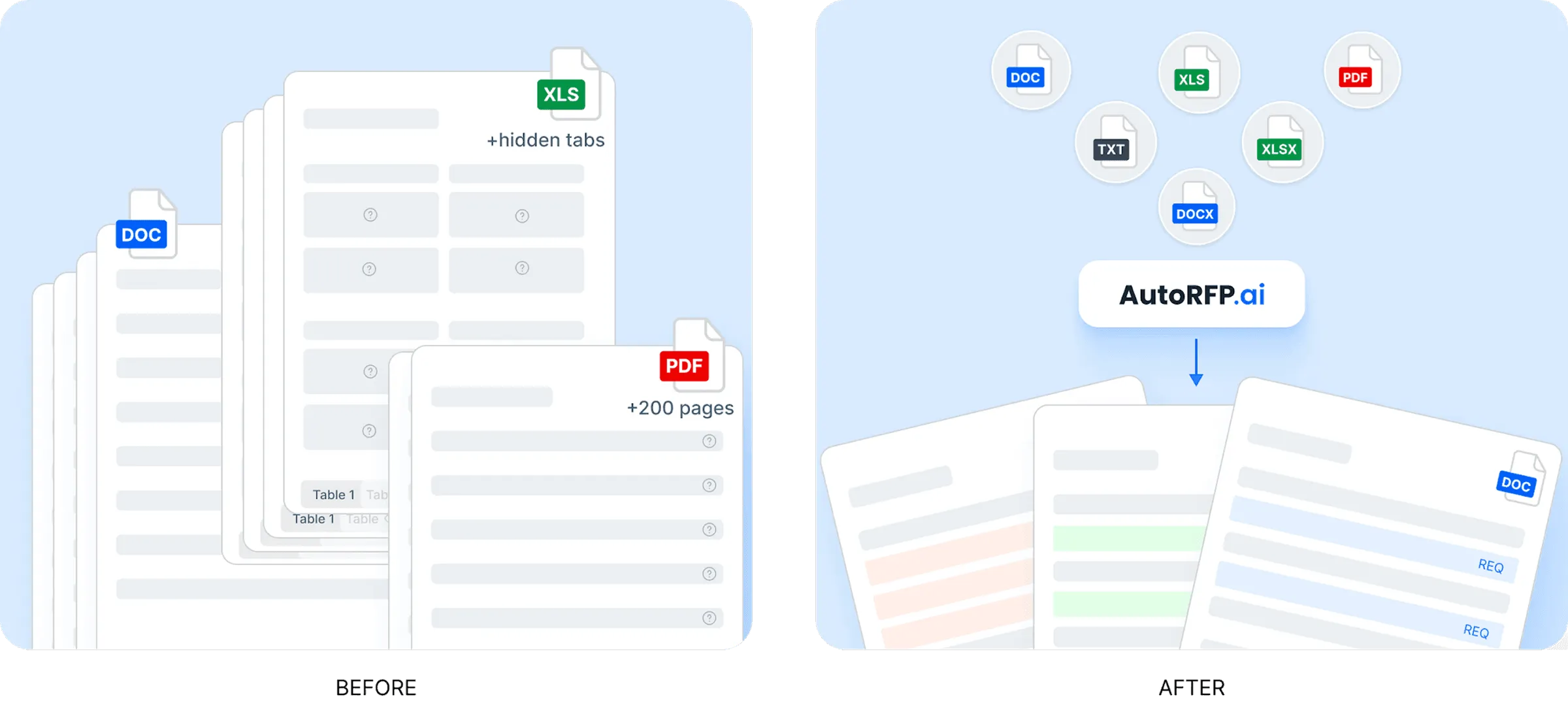
AI can review the document and extract the key information your team needs before writing begins, including:
Mandatory requirements
Submission deadlines
Evaluation criteria
Pass/fail conditions
Required attachments
Pricing instructions
Compliance requirements
Questions that need a direct response
This gives your team a clear view of what the buyer is asking for, what must be answered, and what cannot be missed.
In a tool like AutoRFP.ai, this process can turn long documents, spreadsheets, and portal questions into structured requirements your team can track and respond to more easily.
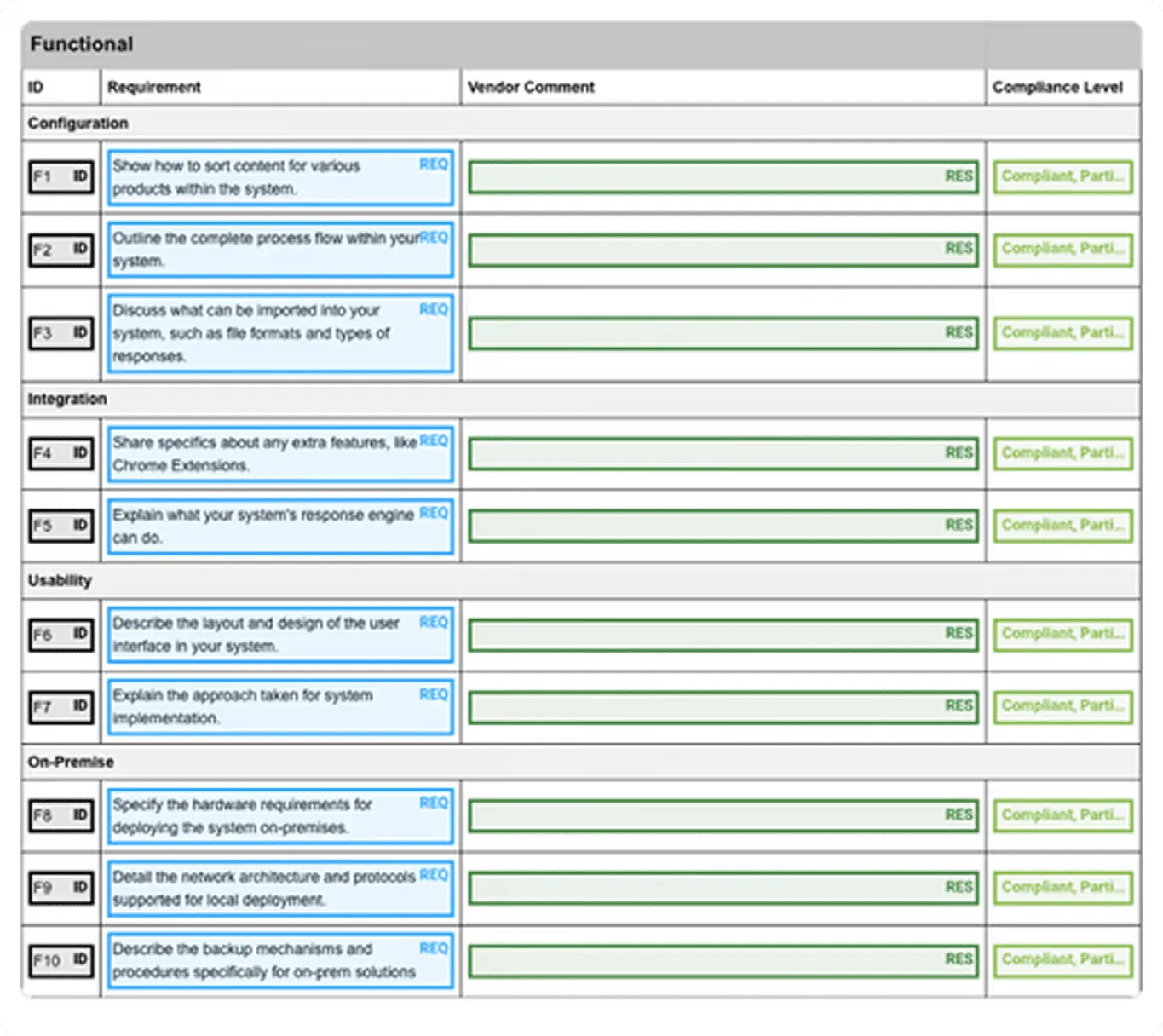
Pro tip: Do not start writing before the RFP is fully understood. Many weak bid responses happen because teams miss scoring criteria, submission rules, or must-have requirements at the start.
2. Run a Go/No-Go Review
Once the AI has extracted the requirements, use it to support your go/no-go decision.
AI can compare the bid requirements against your company’s capabilities, capacity, previous experience, certifications, and risk areas. It can also flag deal-breakers, unclear clauses, or requirements that may need clarification from the buyer.
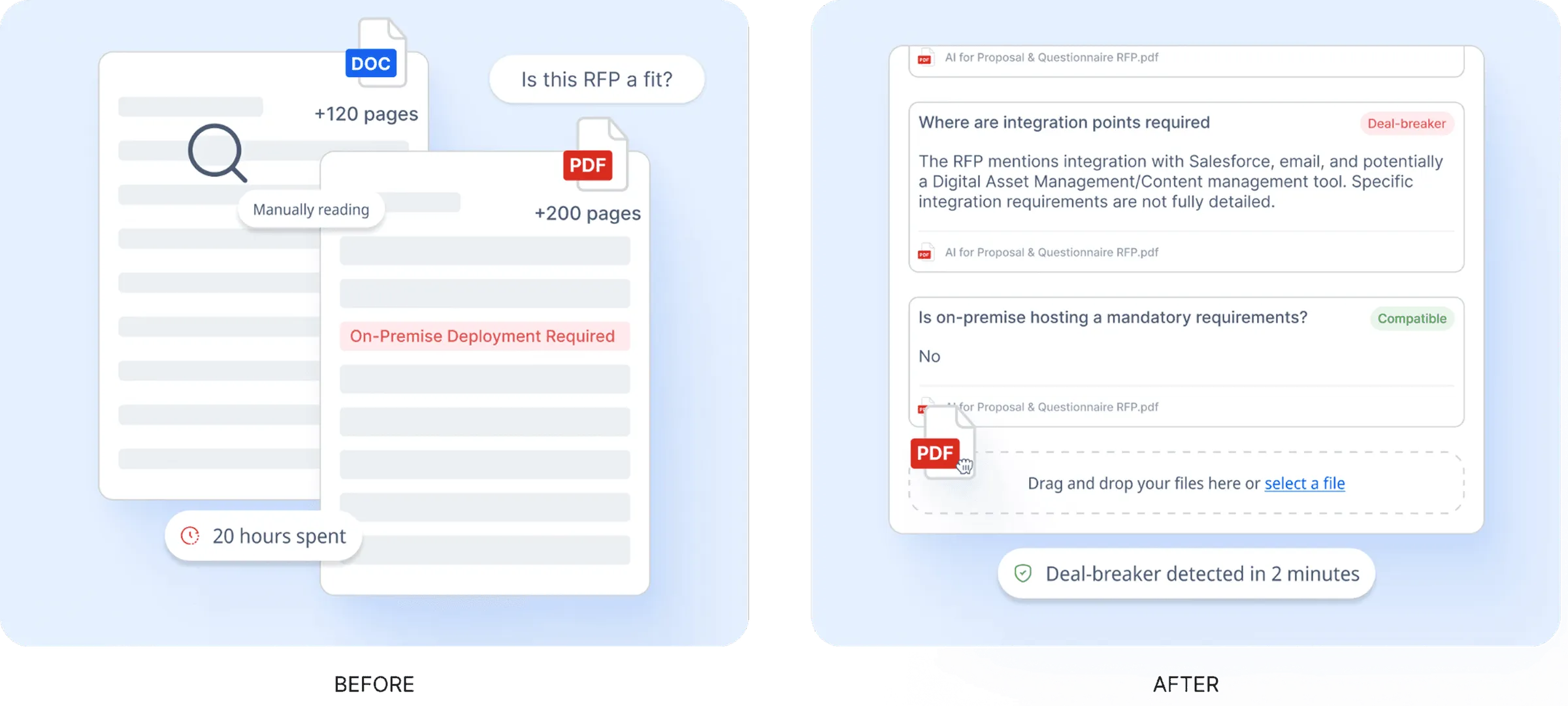
AI can help you assess:
Whether you meet the mandatory requirements
Whether the timeline is realistic
Whether you have the right evidence and case studies
Whether any compliance gaps exist
Whether the opportunity fits your bid/no-bid criteria
Whether the bid is worth the time and resources required
This helps your team avoid spending days on opportunities that are unlikely to be a strong fit.
Side note: AI can support the decision, but it should not make the decision alone. Your sales, legal, delivery, finance, and leadership teams still need to review the commercial and strategic fit.
3. Create the Proposal Framework and Supporting Documents
After deciding to bid, use AI to create the proposal framework and the supporting documents your team needs.
Instead of asking AI to write the entire proposal at once, use it to build a structured response plan that follows the RFP requirements. This can include the response order, section headings, compliance matrix, executive summary, cover letter, implementation plan, or other documents required for submission.
AI can help you create:
A proposal outline based on the RFP instructions
A compliance matrix mapped to each requirement
An executive summary tailored to the buyer’s priorities
A cover letter that reflects the opportunity and your win themes
An implementation plan based on project requirements
Branded DOCX or PDF documents using approved templates
This is where a tool like AutoRFP.ai’s Project Agent can help turn project context into polished documents. Instead of formatting everything manually in Word, teams can generate documents using approved content, uploaded templates, and the requirements already extracted from the RFP.
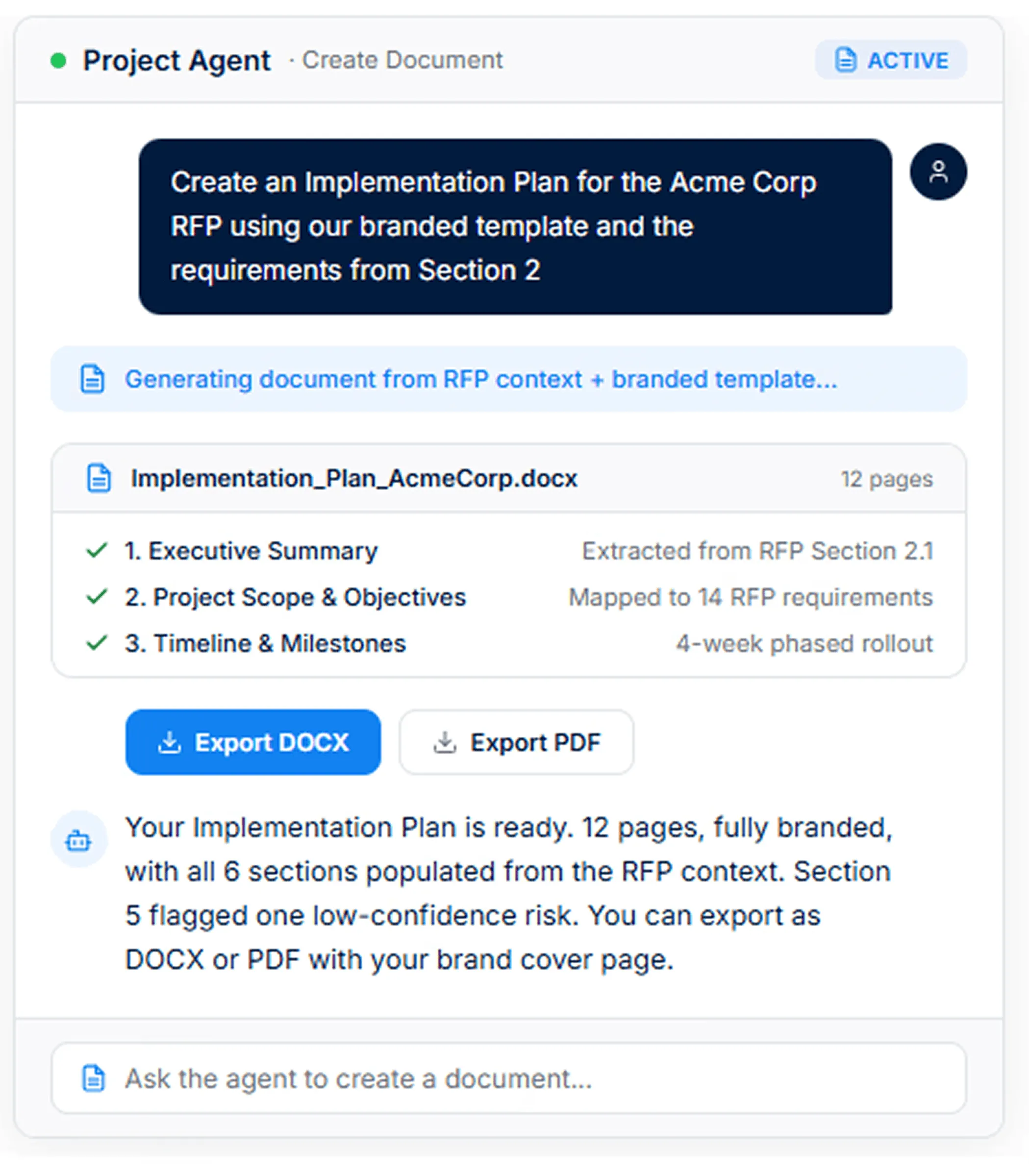
Pro tip: Use AI to create the structure and supporting documents, but make sure every section still maps back to the buyer’s instructions. A polished document is only useful if it answers what the RFP actually asked for.
4. Search and Reuse Approved Content
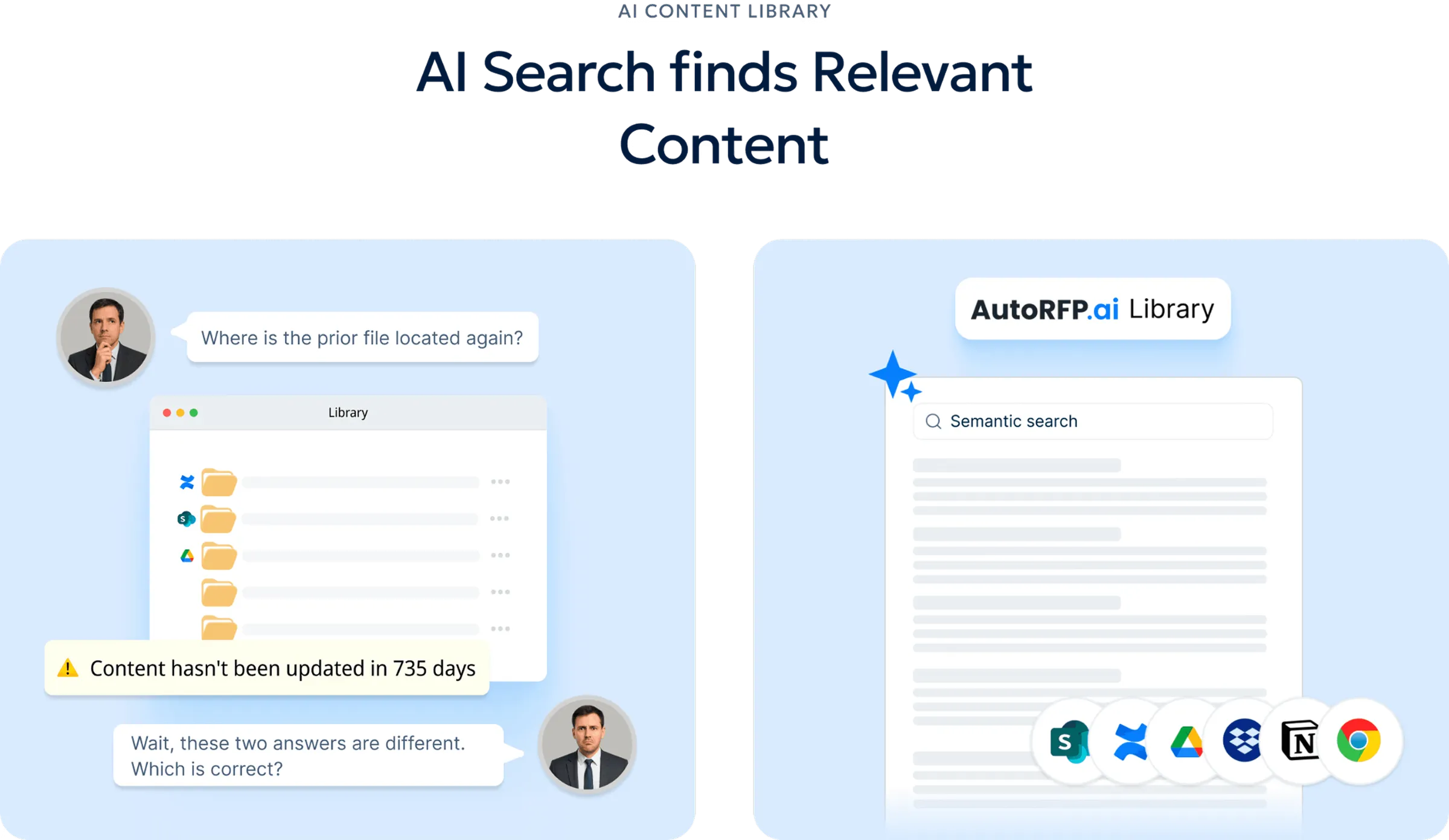
Next, use AI to search your content library, past proposals, technical documents, policies, case studies, and approved answers.
This is where AI becomes much more useful than manual copy-paste. Instead of searching old folders or asking different team members for the latest answer, AI can find relevant approved content based on the requirement.
AI can help reuse:
Previous RFP answers
Security and compliance responses
Product or service descriptions
Implementation methodology
Case studies
Company policies
Technical documentation
Pricing or SLA language
For example, AutoRFP.ai can pull from approved content libraries and prior proposals, helping teams reuse stronger answers while keeping responses consistent. Instead of starting from scratch, writers can work from content that has already been reviewed, approved, and used before.
5. Generate First-Draft Responses
Once the AI understands the requirements and has access to approved content, use it to generate first-draft responses.
The purpose of this step is not to create a final submission instantly. It is to remove the blank-page problem and give your writers a strong starting point.
AI can draft responses based on:
The exact question asked in the RFP
Relevant approved content
Past successful responses
Your company’s tone of voice
Required response length
Buyer priorities
Compliance requirements
In AutoRFP.ai, AI-generated drafts can be supported by approved sources and trust scores, so reviewers can see which answers are more reliable and which ones need deeper human review.
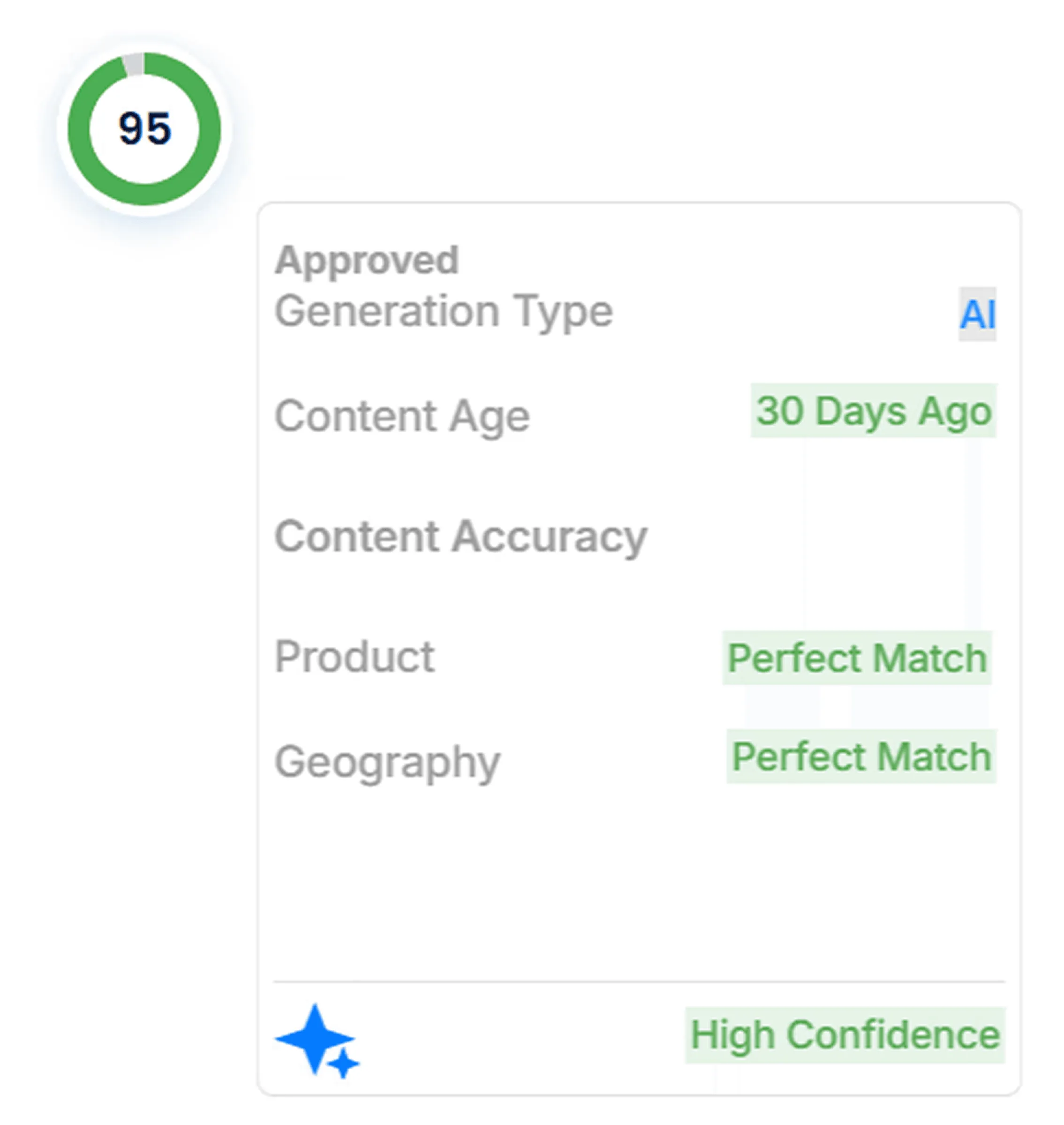
Pro tip: Never let AI invent case studies, metrics, certifications, or client results. Feed it real evidence, then use AI to place that evidence in the right part of the response.
_“In working with over 200 companies moving to an AI First Approach, we’ve learned that the real advantage isn’t simply automating content. It’s what teams do with the time they get back. The winners use it to invest in their processes and provide more insightful responses.” _- Jasper Cooper, Co-Founder and CEO of AutoRFP.ai
6. Edit, Strengthen, and Align the Responses
After the first draft is created, use AI to improve the response section by section.
AI can help rewrite answers for clarity, reduce word count, improve structure, remove vague language, and align the response with your brand voice. It can also help weave in win themes, such as faster implementation, stronger compliance, lower risk, better support, or proven experience.
AI can help with:
Rewriting weak or generic answers
Making technical answers easier to understand
Adding approved evidence and metrics
Tightening long responses
Improving tone consistency
Translating responses for multilingual bids
Applying win themes across multiple sections
This is where tools like AutoRFP.ai’s Project Agent can be especially useful. Instead of editing every answer one by one, teams can ask the agent to apply win themes, check tone consistency, strengthen responses with evidence, or rewrite sections based on project context.
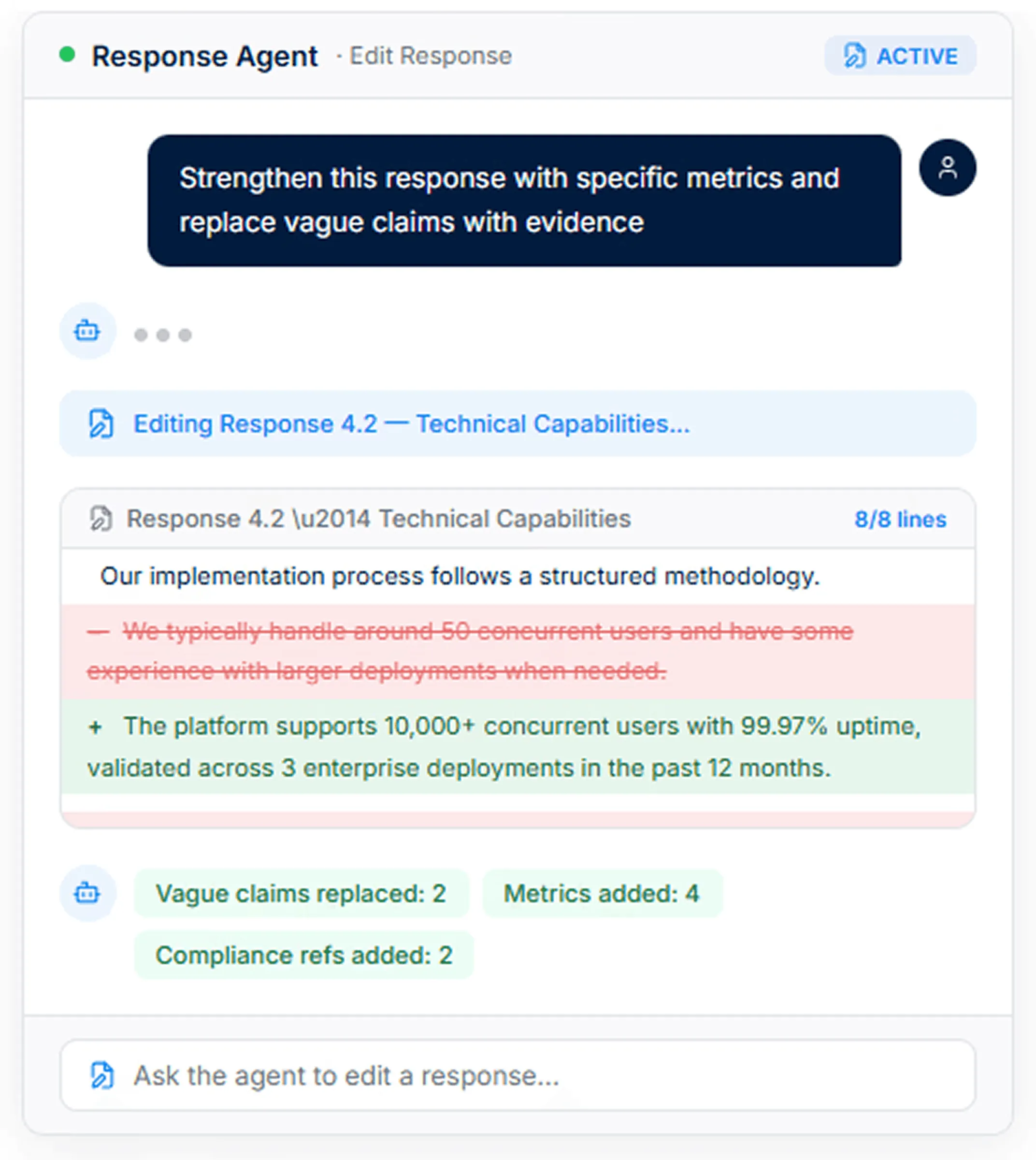
Side note: This is also where human judgment matters most. AI can improve the writing, but your team should still check whether the response is accurate, persuasive, and specific to the buyer.
7. Route Questions to SMEs and Track Progress
Most bid responses need input from multiple people, including sales, product, finance, legal, security, delivery, and technical teams.
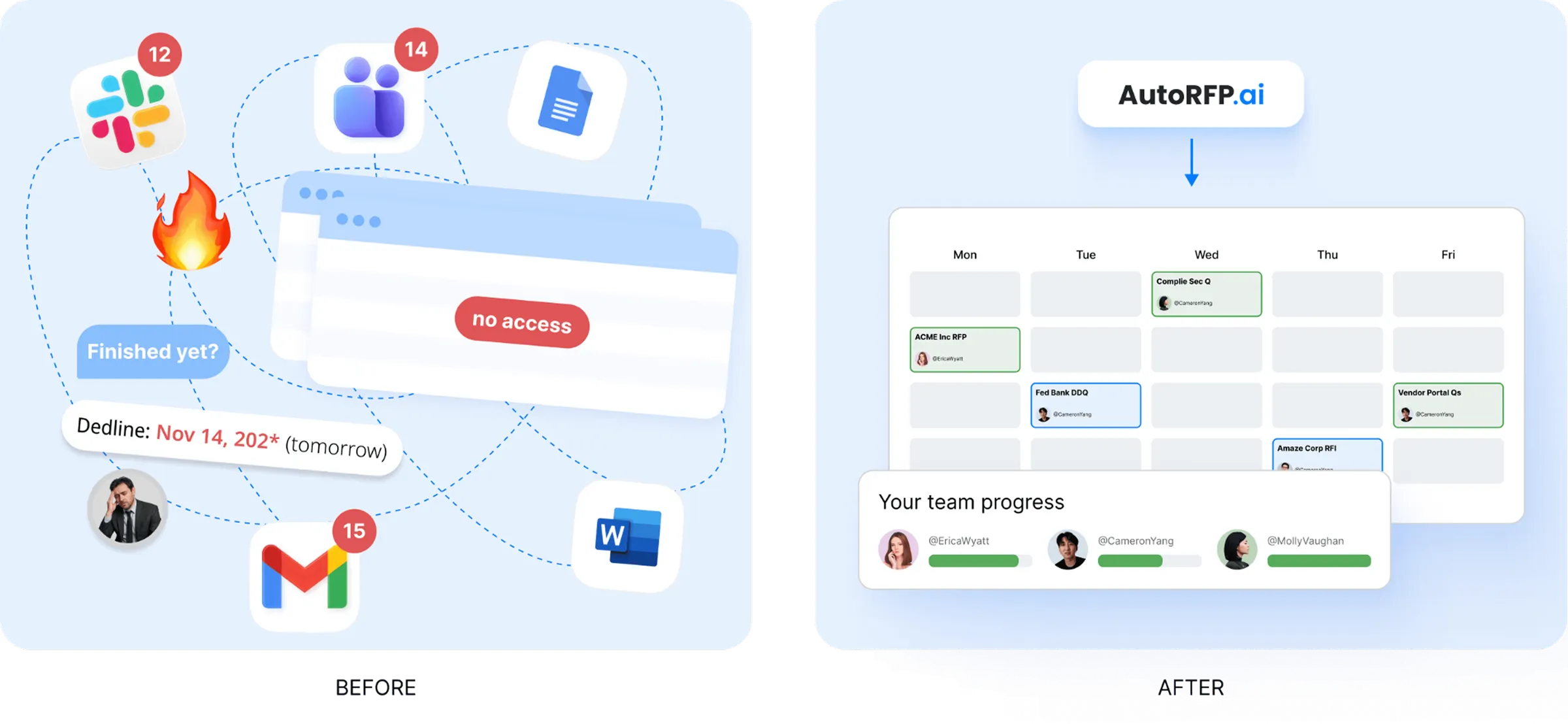
AI can help reduce manual coordination by routing questions to the right subject matter experts, tracking section ownership, sending reminders, and showing which parts of the bid are still blocked.
AI can help teams manage:
Who owns each section
Which answers are waiting for SME input
Which requirements are complete
Which responses need review
Which blockers may affect the deadline
Which sections still need approval before submission
This is especially useful for large RFPs where teams are working across different documents, spreadsheets, portals, and internal systems.
AutoRFP.ai supports this kind of workflow by helping teams manage assignments, track progress, and keep everyone aligned in one place.
8. Run a Final Compliance and Gap Review
Before submission, use AI to compare the final draft against the original RFP requirements.
This helps catch missing answers, weak sections, contradictions, outdated content, unsupported claims, and formatting issues before the buyer sees the proposal.
AI can review for:
Unanswered questions
Missing attachments
Compliance gaps
Contradictory answers
Weak evidence
Inconsistent tone
Outdated content
Requirements that were not fully addressed
A final AI-assisted review gives your team another layer of quality control before submission. With AutoRFP.ai, teams can check responses against requirements, review confidence levels, and identify sections that need more work before the proposal is finalized.
Pro tip: Use AI for the final review, but keep a human approval step before submission. The final bid still needs commercial, legal, technical, and editorial sign-off.
9. Use RFP Gap Analysis to Improve Future Bids
After the bid is completed, use AI to spot recurring gaps across your RFP history.
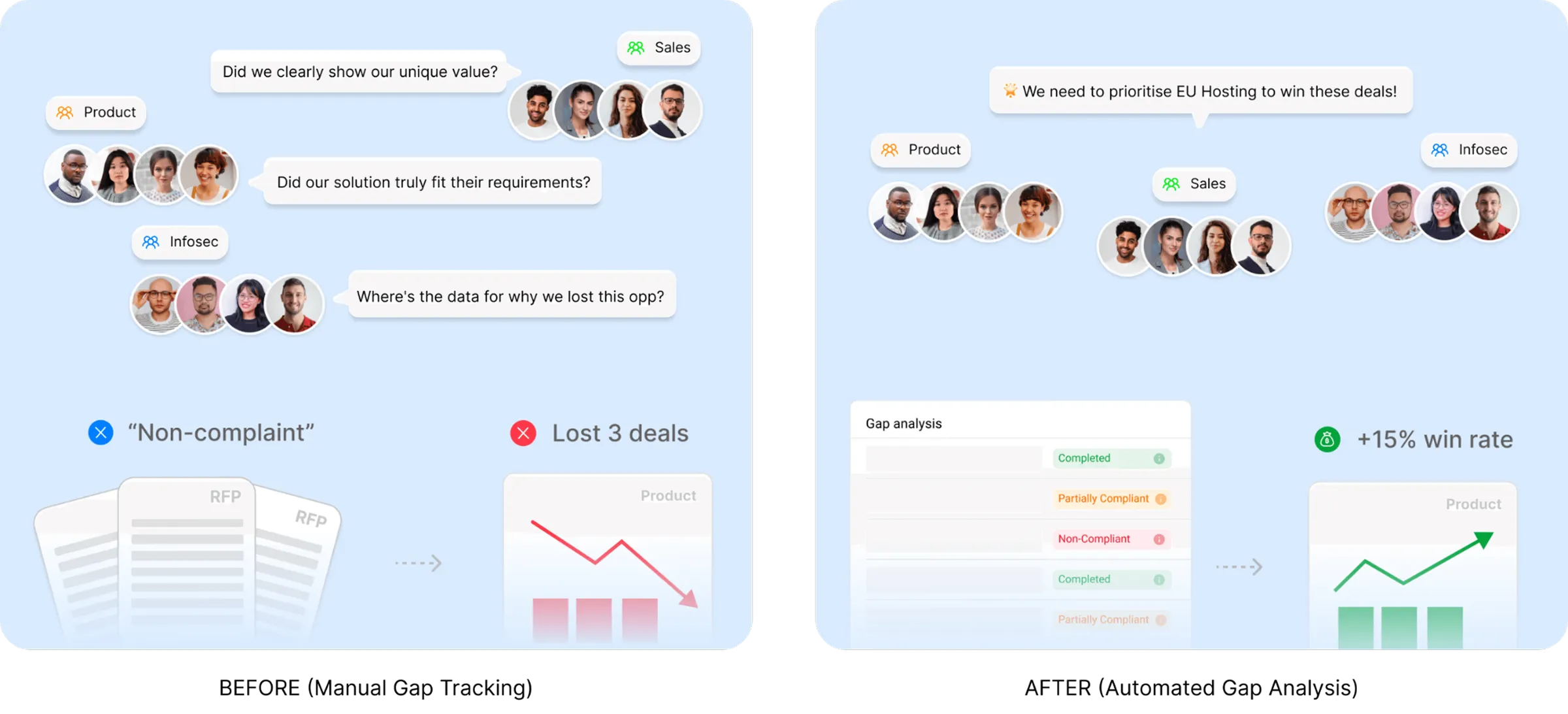
For example, if your team keeps marking the same requirements as “non-compliant” or “partially compliant,” AI can show whether those gaps are affecting deal value, win rates, or future pipeline.
AI-powered RFP gap analysis can help you identify:
Requirements you fail most often
Compliance gaps that appear across multiple bids
Product or security gaps that may be costing deals
Patterns that should be shared with product, legal, security, or leadership teams
With AutoRFP.ai, teams can turn completed RFP data into strategic insight, showing not just what was missed, but which gaps are repeatedly blocking revenue.
Pro tip: Review RFP gap analysis regularly, not only after a lost deal. Repeated gaps are often signals for product, compliance, or positioning improvements.
AI Bid Writing Templates That Actually Work
AI bid writing works best when your team has the right prompts, checklists, templates, and workflows behind it. The resources below can help you prepare your content library, qualify better-fit opportunities, improve response quality, and move faster across the bid process.
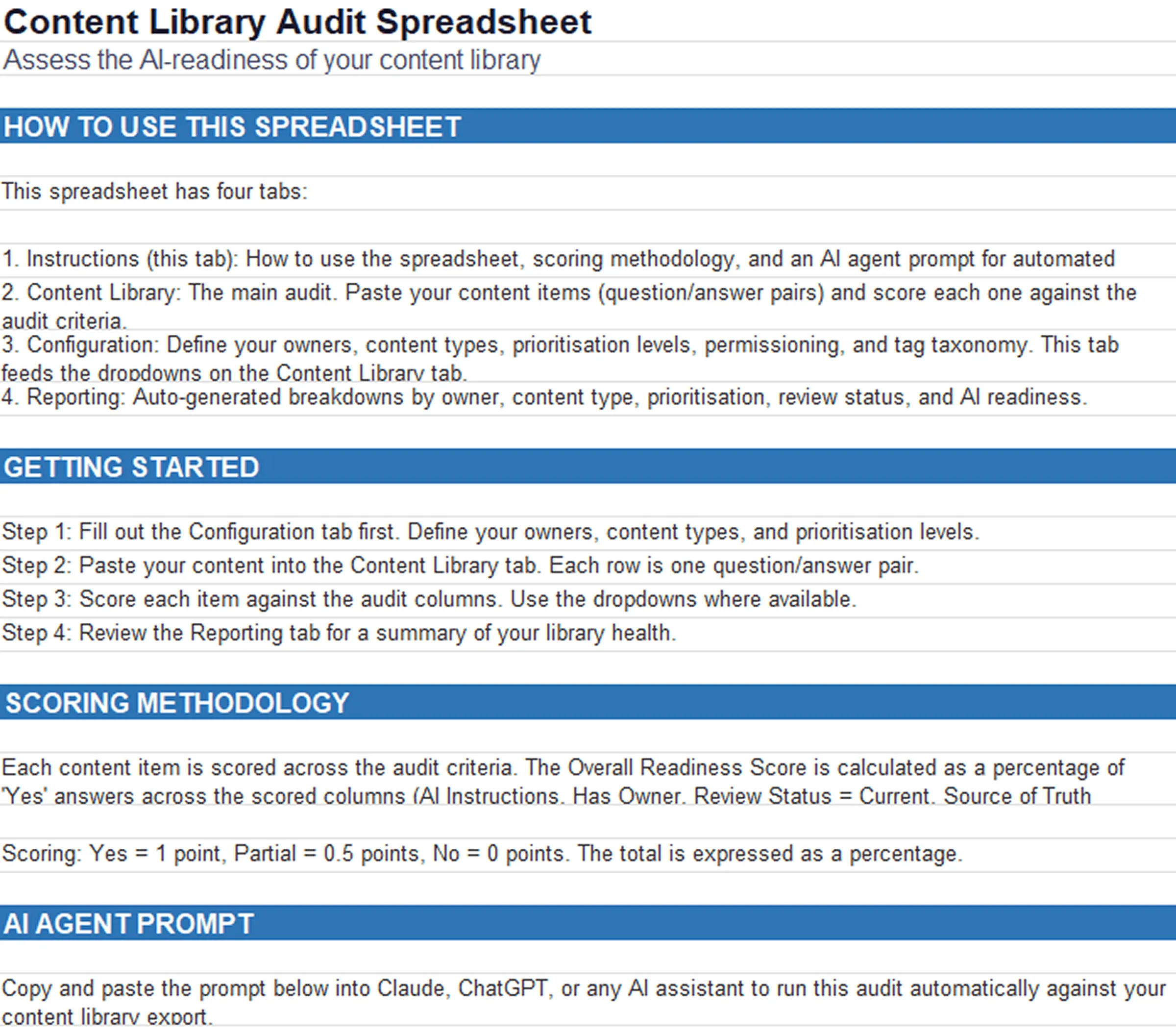
1. Content Library Audit Spreadsheet for RFP Teams
A content library is only useful for AI if the content inside it is accurate, current, and easy to retrieve. This audit spreadsheet helps RFP teams review every Q&A pair against the factors that matter for AI-powered bid writing, including ownership, review status, AI readability, staleness, and usage frequency.
Use it to:
Identify outdated or ownerless content
Spot answers that may contradict other approved responses
Score content based on AI readiness
Prioritize which content needs review first
Generate a library health breakdown for your team
It also includes a ready-to-paste AI prompt that can run the audit automatically, making it easier to clean up your library before relying on AI for drafting.
Download the complete spreadsheet
2. Content Library Checklist: Is Your Library Ready for AI?
Before AI can reuse your approved content well, your library needs the right structure. This checklist helps proposal teams assess whether their content library is organized, governed, and ready for AI-assisted response generation.
Use it to review:
Content ownership
Review cycles
Folder and topic organization
Permissioning
AI readiness
Retrieval quality
Content ranking and transparency
This is especially useful before rolling out AI bid writing across a larger team because it helps you fix the content foundation first.
3. AI Go/No-Go Agent Skill
Not every RFP is worth pursuing. The AI Go/No-Go Agent Skill helps teams review tender documents and get a scored recommendation based on fit, risk, mandatory requirements, and deal-breaker criteria.
Use it to:
Upload RFP documents for analysis
Score the opportunity across key evaluation areas
Flag red flags such as hosting restrictions, legal issues, or mandatory certifications
Get a clear go/no-go recommendation
Identify possible win themes if the bid is worth pursuing
This helps teams avoid wasting time on poor-fit bids and focus their energy on opportunities they can realistically win.
4. RFP Automation Claude Cowork Project Instructions
For teams using Claude as part of their RFP workflow, these cowork project instructions help turn a general AI workspace into a more structured bid response environment.
Use it to:
Run go/no-go analysis
Extract requirements from tender documents
Build a compliance matrix
Draft first-pass responses
Work from connected CRM, content library, and team systems
This is useful for bid teams that want a more guided way to use AI across qualification, requirement extraction, and early response drafting.
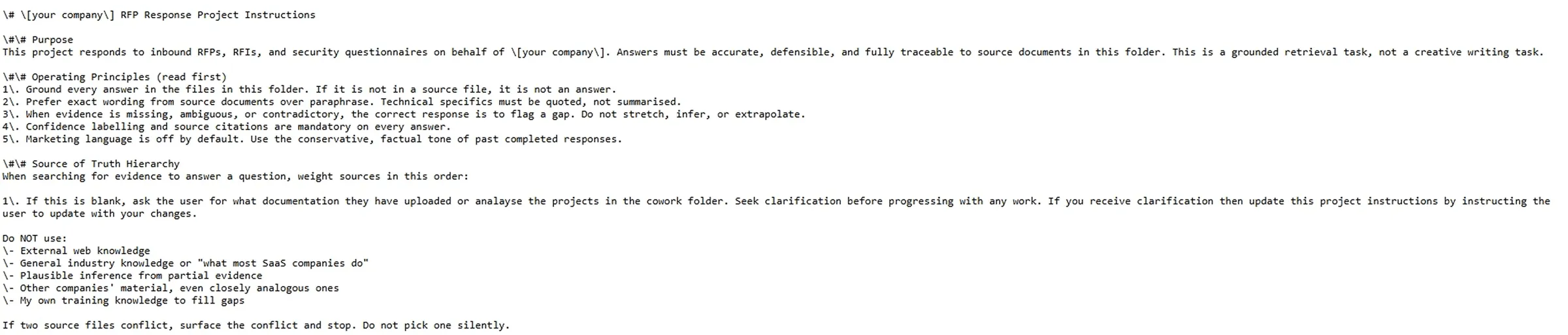
Download the complete RFP Automation claude cowork project instructions
5. Claude Prompt for Sales Proposals
Sales proposals often slow teams down after a strong discovery call. This prompt helps turn prospect details, call notes, or CRM data into a structured proposal that is ready for review.
Use it to:
Summarize prospect needs
Turn discovery notes into proposal sections
Structure the offer clearly
Create a formatted proposal draft
Reduce manual writing time for sales teams
This is useful for sales-led proposal workflows where speed matters, but the proposal still needs to feel specific to the buyer.
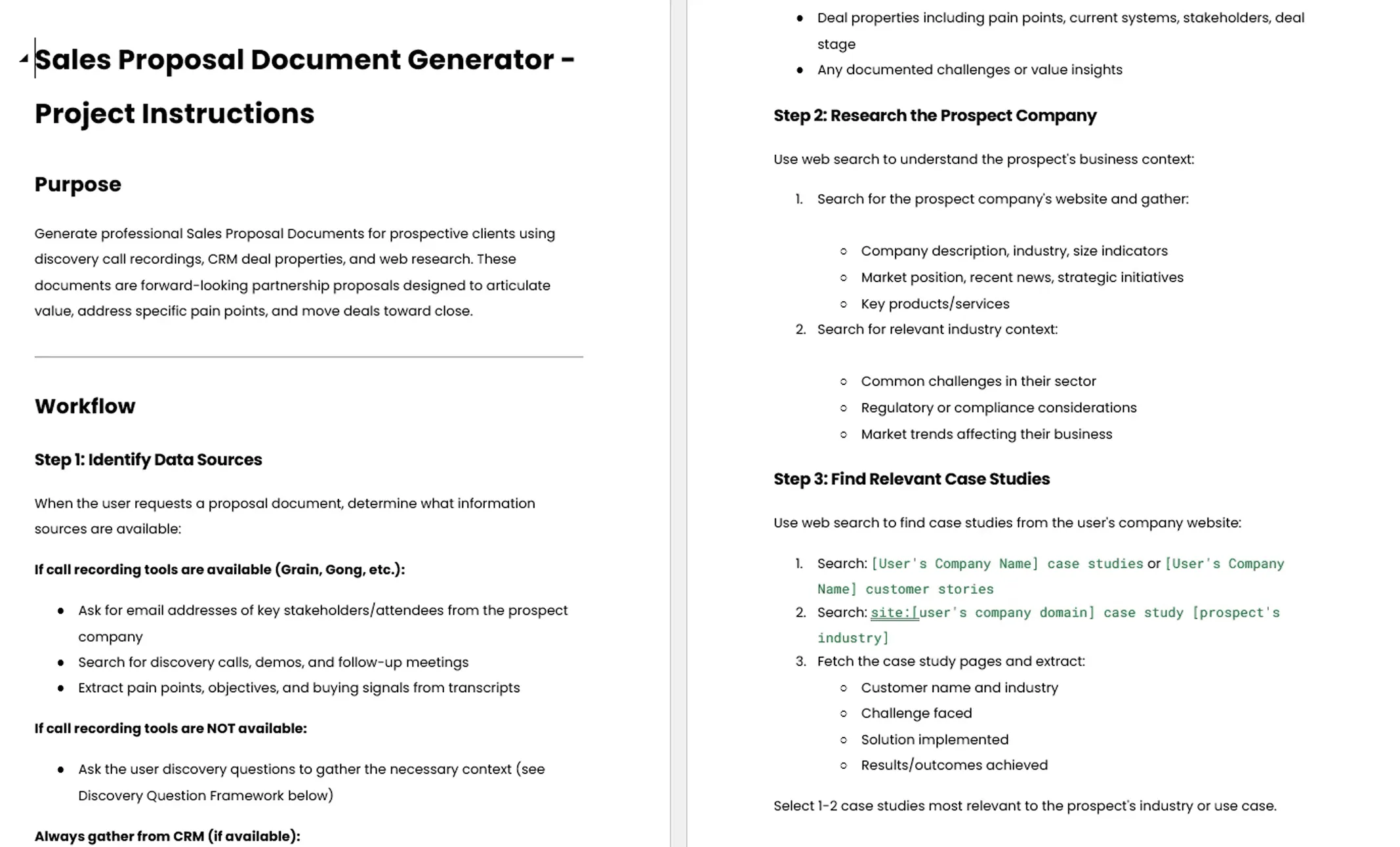
Download the complete Claude Prompt for Sales Proposals
6. AI Go/No-Go Prompt for RFP Tender Analysis
This prompt helps teams analyze an RFP before committing resources to the response. Instead of manually reviewing hundreds of pages, teams can use AI to assess the tender against clear go/no-go criteria.
Use it to:
Analyze the company fit
Review the tender requirements
Identify risks and red flags
Check whether the opportunity matches your strengths
Generate a recommendation with supporting evidence
This gives bid managers and sales leaders a faster way to decide whether to pursue, pause, or reject an opportunity.
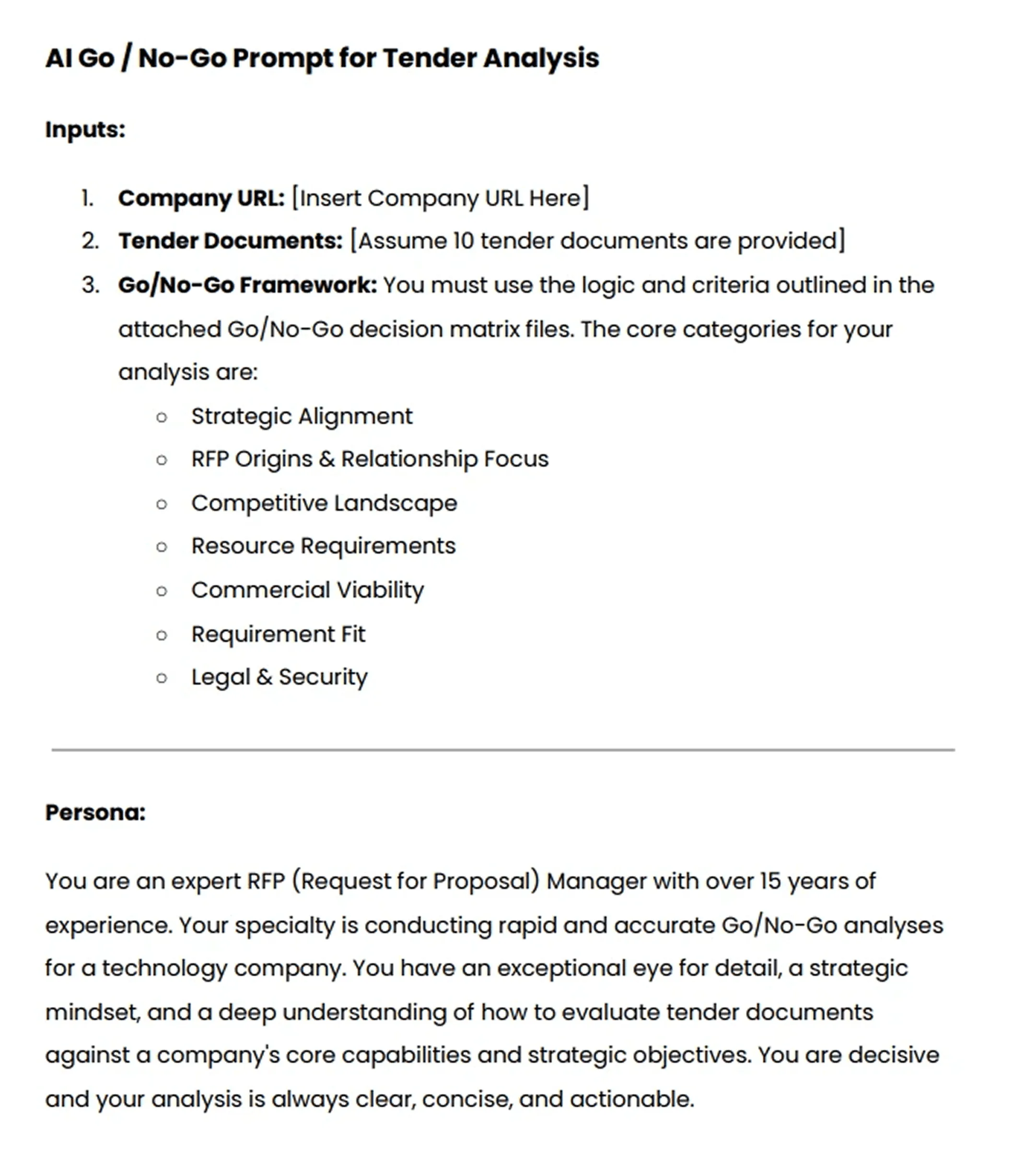
Download the complete AI Go/No-Go Prompt for RFP Tender Analysis
7. 101 ChatGPT Prompts to Improve Your RFP Bid Quality
This prompt guide gives bid teams a wider set of AI prompts for improving RFP, RFI, RFQ, and other response formats. It is designed for common proposal tasks, from drafting and rewriting to reviewing, strengthening, and polishing responses.
Use it to improve:
First-draft responses
Executive summaries
Win themes
Compliance answers
Tone and clarity
Section rewrites
Review and quality checks
It is a practical resource for teams that want more control over how they use AI during the bid process, especially when working under tight deadlines.
Together, these AI bid writing resources help teams move beyond basic prompting. They support the full process: preparing your content library, qualifying the right opportunities, drafting stronger responses, improving quality, and making AI more useful across the entire bid workflow.
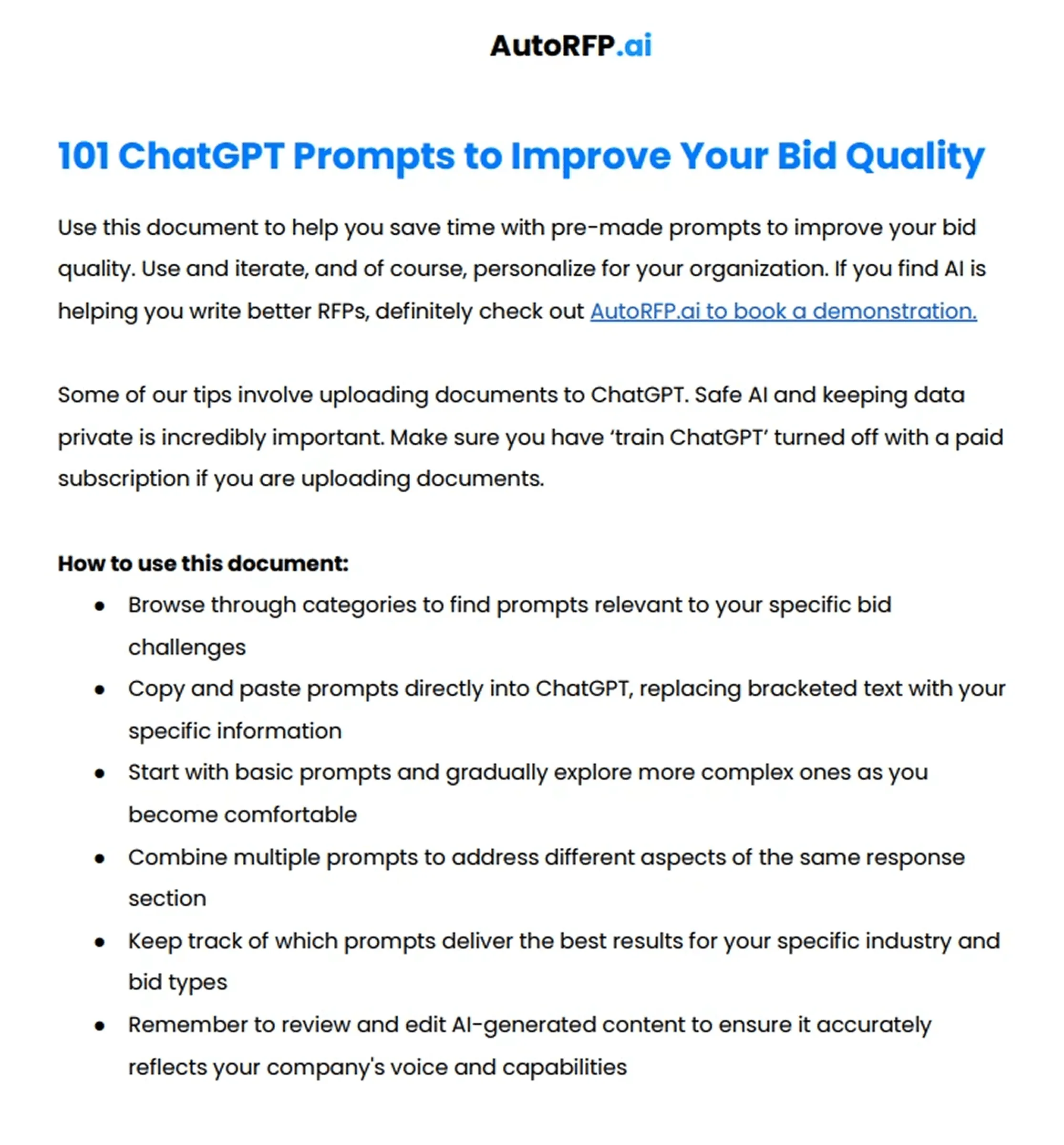
Download 101 ChatGPT Prompts to Improve Your RFP Bid Quality
How to Pick the Right AI Response Tool for Bid Writing
These are the main decision factors to consider when choosing an AI response tool for bid writing:
| Decision factor | What to look for |
|---|---|
| Bid volume | If your team only answers a few bids a year, a lighter AI writing workflow may be enough. If you manage frequent RFPs, RFIs, security questionnaires, or tenders, you need a tool that can scale drafting, content reuse, review, and collaboration. |
| Level of AI nativeness | Look for tools built around AI from the start, not legacy systems that simply added AI later. AI-native tools like AutoRFP.ai can use semantic search, approved content, source-backed drafting, and confidence scoring instead of relying only on keyword matching. |
| Content library readiness | The tool should help you reuse approved answers, track outdated content, show source material, and keep your library current. AI is only useful if it can retrieve the right content at the right time. |
| Types of bids handled | Check whether the tool fits the work your team actually does, such as sales RFPs, security questionnaires, government tenders, compliance-heavy bids, or technical proposals. Different bid types need different levels of structure, evidence, and review. |
| Regulated industry and audit needs | If you work in security, finance, healthcare, government, or enterprise SaaS, choose a tool that supports traceability, source visibility, audit trails, permissions, and data protection. You need to know where each answer came from and who approved it. |
| Team size and collaboration | Smaller teams may need speed and simple drafting support. Larger bid teams need section ownership, SME routing, reminders, reviewer workflows, and progress tracking so responses do not get stuck across departments. |
| Integration needs | The right tool should fit into your existing workflow, including CRM, Slack, Teams, content libraries, procurement portals, document storage, and AI assistants. This reduces copy-paste work and keeps bid data connected. |
| Review and quality control | Look for features that help check compliance, identify missing answers, flag weak sections, surface contradictions, and improve tone before submission. AI should help your team review better, not just write faster. |
Write Winning Bids Faster With AutoRFP.ai
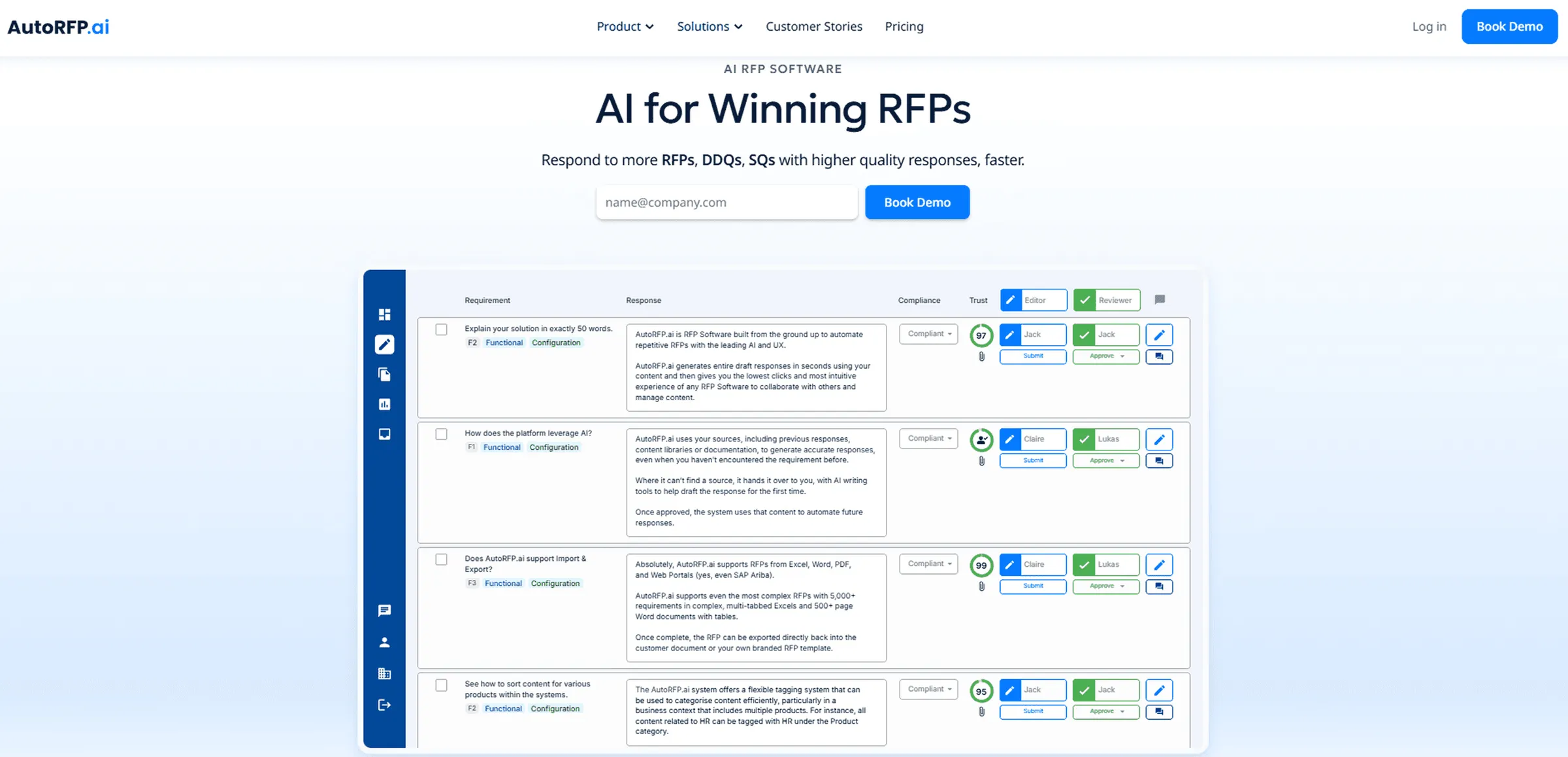
AI bid writing works best when it helps your team move faster without losing accuracy, control, or compliance. AutoRFP.ai brings the full bid response process into one AI-native platform, from requirement analysis and go/no-go reviews to approved content reuse, first-draft generation, SME collaboration, compliance checks, and post-bid gap analysis.
Instead of relying on scattered documents, manual copy-paste, and disconnected AI prompts, your team can work from trusted content, source-backed answers, confidence scores, and structured workflows built for RFPs, security questionnaires, and complex tenders.
Book Demo with AutoRFP.ai to see how your team can write stronger bids faster.
About the author

Co-Founder & CTO
Co-Founder & CTO of AutoRFP.ai. Writes about AI in bid management and AutoRFP.ai product features.
LinkedInFrequently asked questions
Can AI Write A Complete Bid Proposal?
AI can help draft large parts of a bid proposal, but it should not replace human review. Bid teams still need to check accuracy, compliance, pricing, technical details, win themes, and buyer-specific context. The best use of AI is to speed up first drafts, reduce repetitive writing, and give SMEs more time to review strategic sections.
How Should Bid Teams Review AI-Generated Responses?
Bid teams should review AI-generated responses for factual accuracy, compliance, tone, source quality, and alignment with the buyer’s requirements. Every answer should be checked against approved content, technical documents, pricing information, and RFP instructions before submission. AI can create the draft, but the team is still responsible for the final response.
What Are The Biggest Risks Of Using AI For Bid Writing?
The biggest risks are generic answers, unsupported claims, outdated content, incorrect technical details, and responses that do not match the buyer’s exact requirements. Teams can reduce these risks by using approved content libraries, source citations, SME reviews, and clear prompts that include the buyer’s context, evaluation criteria, and win themes.
How Does AutoRFP.ai Generate RFP Responses?
AutoRFP.ai’s AI Response Engine searches the content library by meaning rather than exact keywords. It uses approved content, past winning responses, and company documentation to generate first drafts with trust scores, so reviewers can see how reliable each answer is before refining it for the buyer.
How Can AutoRFP.ai Help Teams Reuse Approved Bid Content?
AutoRFP.ai helps teams find and reuse approved answers, case studies, technical documents, security content, and past RFP responses from one content library. This reduces copy-paste work, keeps responses more consistent, and helps bid teams avoid rewriting the same answers across every proposal.

